PDF Dark Mode on Android — No Root, No System Hack
By PDF Dark Team · · 4 min read
You tap a PDF attachment on your phone and the viewer fills the screen with white — even though the phone has been on the dark theme for years. You check the viewer's menu: print, share, open with, nothing about dark. So you dig into Settings, find Color Inversion under Accessibility, and now your home screen icons and photos look like X-ray film. That dead end isn't your phone — Android has no real PDF dark mode, and users have been asking for one on Google's own Drive and Docs forums for years. Here's the way around it.
The quick answer
To just read, open the PDF dark mode reader in any Android browser and pick your PDF — it renders dark immediately. To keep a dark copy that opens dark in Files by Google, WPS, or any other viewer, run it through the converter once. Both run on your phone; the file is never uploaded.
Option 1: read with a dark theme in your browser
Android's built-in viewers have no dark switch for the page, and the system-level Color Inversion isn't scoped to the document — so the fastest route skips both:
- Open the PDF dark mode reader in Chrome, Firefox, or any Android browser.
- Pick the PDF from your Downloads folder or file manager.
- Choose a theme — Midnight, Sepia, Solarized, or pure-black OLED — and read. Pages render dark right in the tab.
Nothing installs and nothing changes on your phone — no Accessibility toggle to remember to switch off afterward. It works the same on a Pixel, a Samsung, or any other phone, in whatever browser you already use.
Before / after
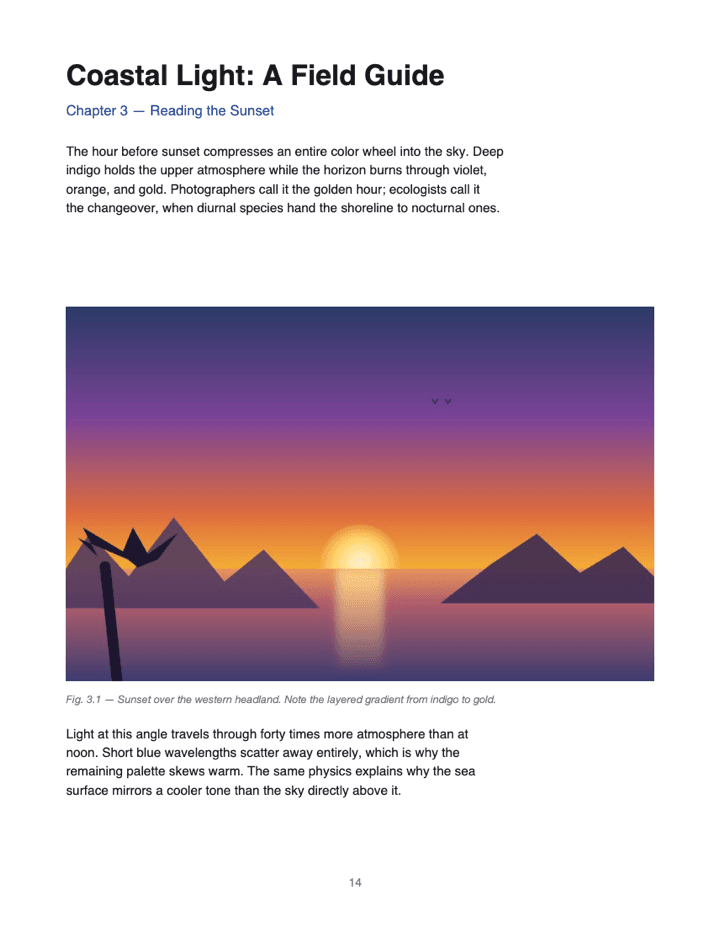
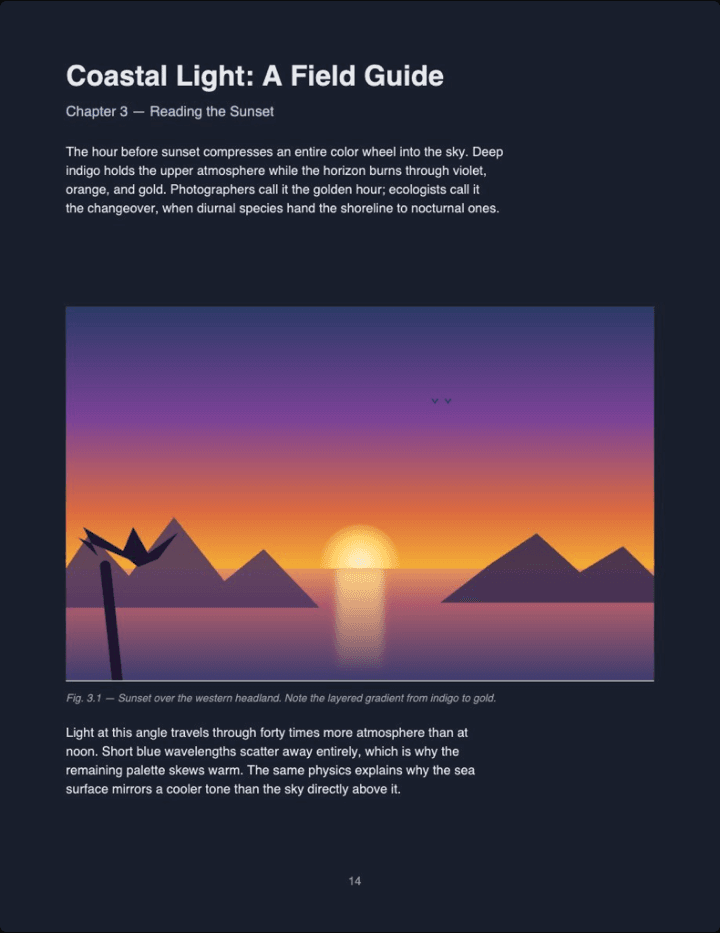
Real output (Midnight theme, Auto image mode) — not a mockup. Notice the photo keeps its original colors instead of flipping into a negative, the way Color Inversion would leave it.
Option 2: convert the file, then open it in any app
When you want the PDF to stay dark — in your usual viewer app, after reopening, or on someone else's phone — convert it once:
- Open the converter in your browser and pick the PDF.
- Choose a theme and tap Download. The dark copy saves to your Downloads folder like any other file.
- Open it in Files by Google, WPS, Acrobat, or whatever viewer you normally use — it opens dark in all of them.
The conversion runs in the browser tab on your phone, whatever the manufacturer or Android version — nothing is uploaded. Because the colors are rewritten inside the file, the copy stays dark when you send it to someone else's phone too.
Have a PDF open on your phone right now? Drop it on the reader and it renders dark in your browser — no app install, no Accessibility settings to flip.
Read a PDF in dark mode →PDF dark mode on Android FAQ
Does Android have a built-in PDF dark mode?
Not a real one, at least not today. The default viewer in Files by Google still renders PDF pages on a white background regardless of your system theme.
What about the 'Dark theme' setting inside Files by Google or Drive?
That toggle darkens the app chrome — toolbars, menus, file lists. The PDF page itself still renders as black text on white.
Can I use Android's Color Inversion accessibility setting instead?
You can, but it flips your entire screen — every app, icon, and photo, not just the PDF — and you have to remember to switch it back off.
What about viewing PDFs saved in Samsung Notes?
Samsung Notes has a known quirk: dark mode doesn't apply to imported PDFs when the note's default color style is Transparent. Switching it to Black in Notes settings is the reported fix.
How is this different from a system-wide fix?
PDF Dark changes nothing on your phone. You convert the file once, and the output is an ordinary PDF with the dark theme baked in — it opens dark in any viewer, on any phone.
Is my PDF uploaded anywhere when I use this on my phone?
No. The conversion runs entirely in your Android browser tab — nothing is sent to a server, and there's no account or install.