Read PDFs in Dark Mode
Drop a PDF and read it on a dark background right here — pick a theme, tune darkness and warmth, and page through comfortably at night. The whole thing runs in your browser: no upload, no signup, no install.
Want to keep the dark version? Invert the colors and download the file.
Need a grayscale or two-color copy instead? Convert your PDF to black and white.
Dark mode shouldn't ruin your photos
The same page, three ways. A basic inverter flips every pixel, so photos come out as film negatives. PDF Dark darkens text and background but detects photos and keeps their colors.
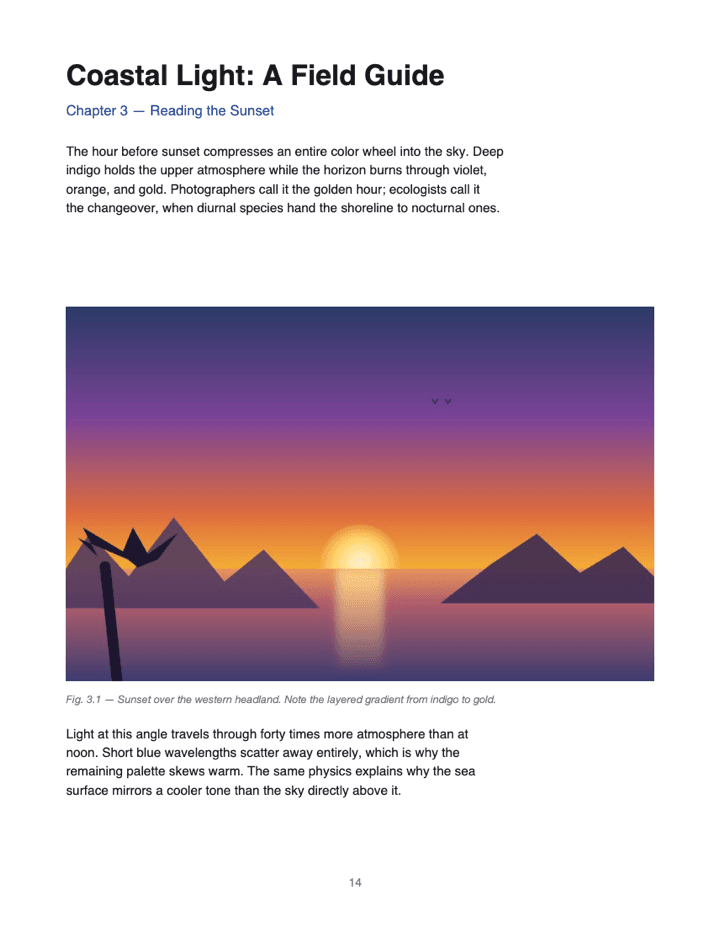
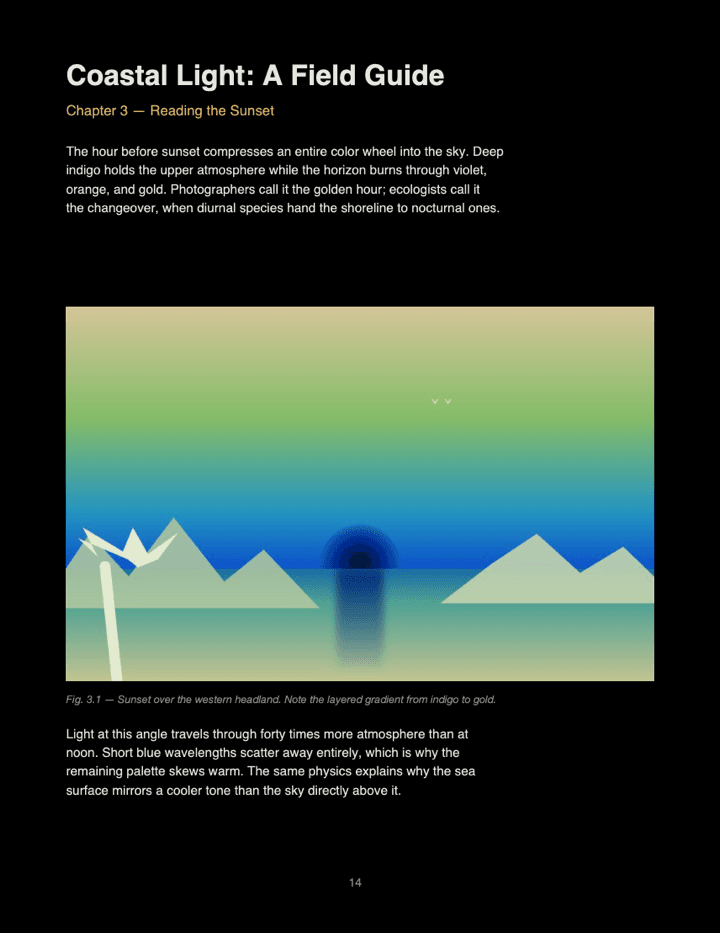
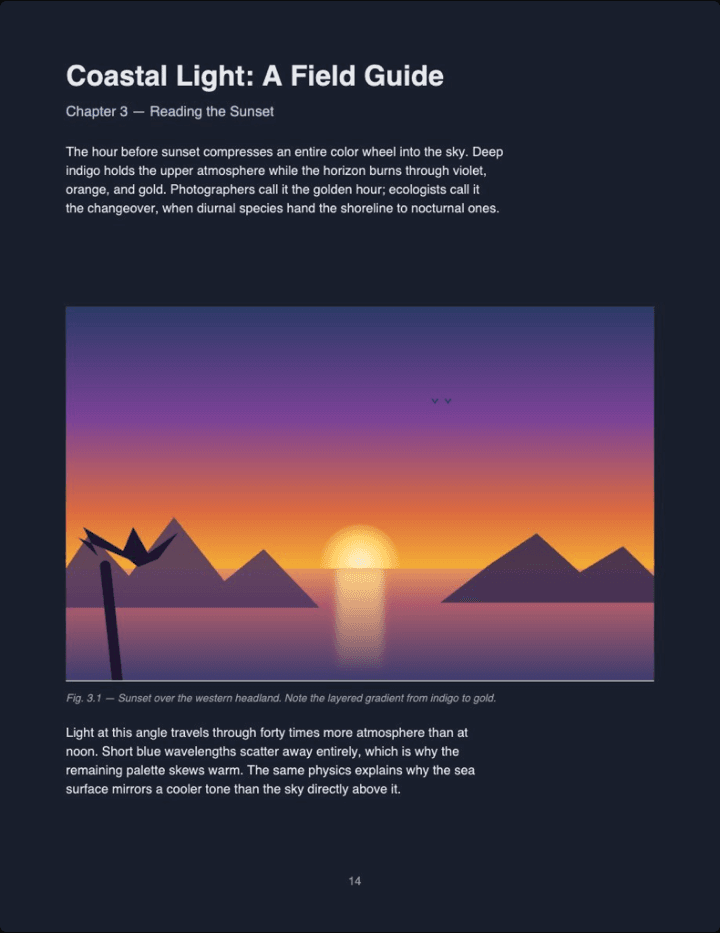
Left: the original page as rendered. Middle: the same page after a raw RGB pixel inversion — the method most basic tools use. Right: real output from this converter (Midnight theme, Auto image mode).
PDF Dark vs Chrome extensions vs online tools
There are a few ways to read PDFs in dark mode or night mode today—browser extensions, other online converters, native readers. Here's how each compares for everyday use.
| Feature | PDF Dark | Chrome Extensions | Other online tools |
|---|---|---|---|
| No install needed | ✓ | ✗ | ✓ |
| Read in-browser before downloading | ✓ | ✗ | Varies |
| Save as new PDF file | ✓ | ✗ | ✓ |
| Photos keep original colors (not negatives) | ✓ | ✗ | ✗ |
| Text stays selectable & searchable | ✓ | ✗ | ✗ |
| Image control: Original / Auto / Invert | ✓ | ✗ | ✗ |
| Darkness & warmth sliders, saved into the file | ✓ | ✗ | ✗ |
| Works on iOS Safari | ✓ | ✗ | ✓ |
| 100% local (no upload) | ✓ | ✓ | ✗ |
No install needed
Read in-browser before downloading
Save as new PDF file
Photos keep original colors (not negatives)
Text stays selectable & searchable
Image control: Original / Auto / Invert
Darkness & warmth sliders, saved into the file
Works on iOS Safari
100% local (no upload)
What is PDF dark mode?
The short version
It's a way to read PDF documents with a dark background and light text instead of the default white page. You may also see it called PDF night mode, a dark PDF reader, or an inverted PDF — different names for the same thing: a low-light theme baked into the file so it stays dark in every viewer, not just the one you opened it in.
Why use a dark mode PDF
People use a dark mode PDF to read at night and reduce eye strain, to extend battery life on OLED phones, to study late-night research papers, and to make code- or text-heavy documents less harsh under bright office lights. Browser extensions can fake a dark theme inside the viewer, but the underlying PDF file stays light. PDF Dark produces an actual dark-themed PDF you can save, share, and reopen anywhere — a real dark PDF, not a viewer trick.
Conversion, not just a viewer hack
A good dark mode reader for PDFs does more than paint the screen dark — it rewrites the file with inverted colors so the document stays dark wherever you open it. With PDF Dark you can read in Chrome, Firefox, Safari, or Edge, then carry the converted file to your phone or e-reader. It never leaves your device: the entire conversion runs in your browser via a Web Worker, so nothing is ever uploaded.
How to read a PDF in dark mode
Text and background are inverted into a low-light theme while images get smart per-image handling — photos keep their colors. You can start reading as soon as the first page renders.
Drop your PDF
Pick a theme
Read
From the PDF Dark blog
Guides on converting, inverting, and darkening PDFs — browser-specific tips, and producing a permanent dark-themed file. Each post has the converter inline if you'd rather just drop in a PDF.
How to Put a PDF in Dark Mode
Scanned PDF Dark Mode
How the Conversion Works
PDF Readers with Dark Mode, Compared
Frequently Asked Questions
Can I turn a PDF into dark mode?
Yes — free and without installing anything. Drop the PDF on this page to read it on a dark background right away, or invert its colors and download a copy with the dark theme written into the file.
Is my PDF uploaded to your server?
No. PDF Dark runs 100% in your browser. We literally don't have a server that receives your file.
How can I print a PDF in dark mode?
Download a dark-themed copy first, then print it from any reader. Because the colors are written into the file itself, the print output is dark too — not just the on-screen view. Invert PDF Colors.
Does this work on iPhone or iPad?
Yes. Safari on iOS can open PDFs directly on this page—no app install needed, and the file still never leaves your device.
How is this different from a browser dark-mode extension?
Extensions only restyle the page while it's open in your browser — close the tab or hand the file to someone else and it's bright again. PDF Dark rewrites the actual PDF: text and background are recolored into your chosen theme, images are handled per your choice, and the result is saved back into the file. The dark theme stays with the PDF wherever you open it. PDF Dark Mode in Chrome.
Does it work for scanned PDFs?
Yes. Scanned pages are treated as what they are — images — and inverted uniformly, so handwriting and scanned text become light-on-dark automatically. Even old yellowed scans normalize to your theme background. Scanned PDF Dark Mode.
How do I read a PDF at night without eye strain?
Convert the PDF to dark mode here and pick OLED or Midnight—both turn the white background into pure or near-pure black so your eyes don't have to fight a bright page in a dim room. Text inverts to light tones; images are handled smartly so photos don't turn into negatives.
Will my photos be inverted too?
Only if you want them to be. By default each image gets the best treatment automatically: photos keep their original colors, white screenshots and diagrams are inverted to blend with the page, and bright colorful images get a gentle dim. The Images toggle in the toolbar (next to the themes) lets you force everything Original or everything Inverted. Invert PDF Colors.
Can I change a PDF background to black?
Yes. The OLED theme renders the background as pure black (#000) and text in light tones — near-white for regular body text — which is the most aggressive dark mode for PDFs. You can also download the PDF with that black background written in.
Is this a dark mode for Adobe Acrobat?
Not exactly. Acrobat has its own in-app dark mode, but it only affects how you see the PDF inside Acrobat—the file itself stays light. PDF Dark produces a real dark-mode PDF file you can open in any reader (Acrobat, Preview, browser) and it stays dark. PDF Dark Mode in Adobe Acrobat.
Does PDF dark mode work in Firefox?
Yes. Firefox's built-in PDF.js viewer only darkens the toolbar, not the page content. PDF Dark converts the actual page content so the file looks dark in every viewer, including Firefox. PDF Dark Mode in Firefox.