Read PDFs in Dark Mode
Drop a PDF and read it on a dark background right here — pick a theme, tune darkness and warmth, and page through comfortably at night. The whole thing runs in your browser: no upload, no signup, no install.
Want to keep the dark version? Invert the colors and download the file.
Need a grayscale or two-color copy instead? Convert your PDF to black and white.
Dark mode shouldn't ruin your photos
The same page, three ways. A basic inverter flips every pixel, so photos come out as film negatives. PDF Dark darkens text and background but detects photos and keeps their colors.
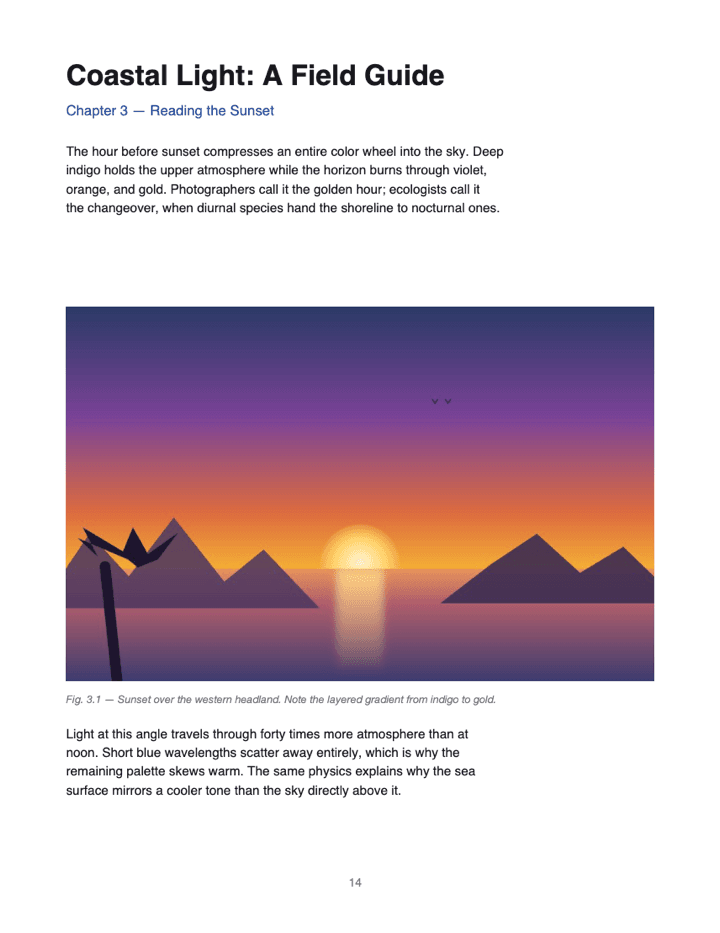
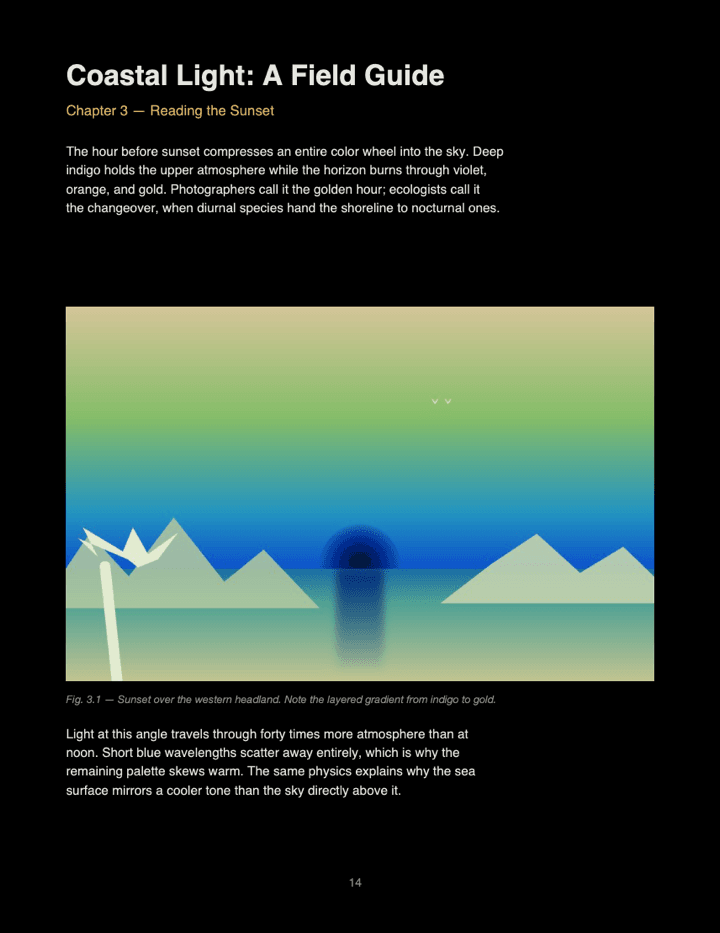
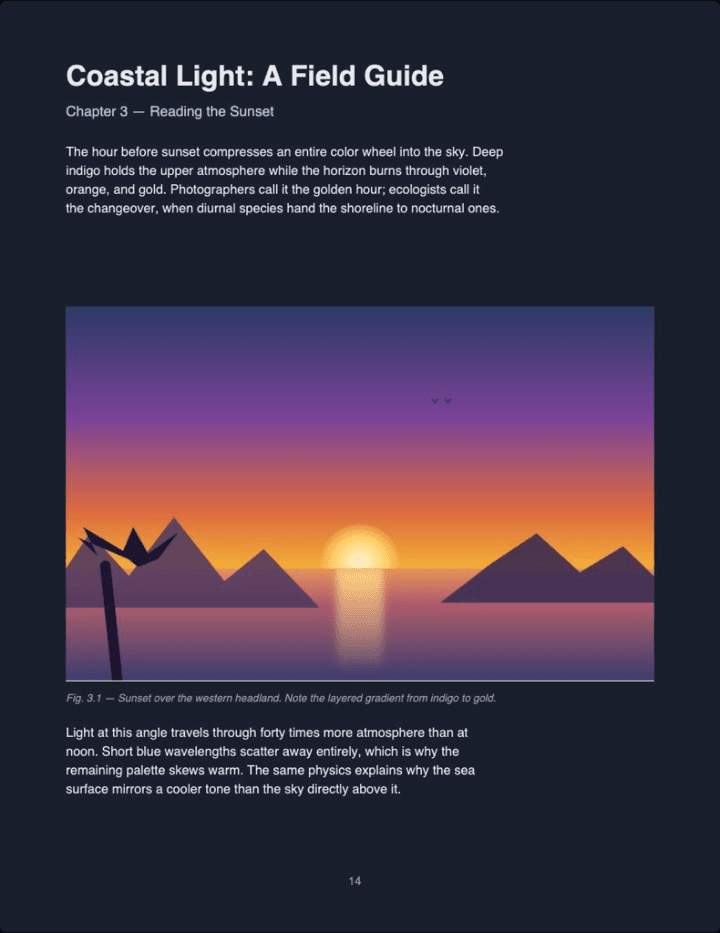
Left: the original page as rendered. Middle: the same page after a raw RGB pixel inversion — the method most basic tools use. Right: real output from this converter (Midnight theme, Auto image mode).
PDF Dark vs Chrome extensions vs online tools
There are a few ways to read PDFs in dark mode or night mode today—browser extensions, other online converters, native readers. Here's how each compares for everyday use.
| Feature | PDF Dark | Chrome Extensions | Other online tools |
|---|---|---|---|
| No install needed | ✓ | ✗ | ✓ |
| Read in-browser before downloading | ✓ | ✗ | Varies |
| Save as new PDF file | ✓ | ✗ | ✓ |
| Photos keep original colors (not negatives) | ✓ | ✗ | ✗ |
| Text stays selectable & searchable | ✓ | ✗ | ✗ |
| Image control: Original / Auto / Invert | ✓ | ✗ | ✗ |
| Darkness & warmth sliders, saved into the file | ✓ | ✗ | ✗ |
| Works on iOS Safari | ✓ | ✗ | ✓ |
| 100% local (no upload) | ✓ | ✓ | ✗ |
No install needed
Read in-browser before downloading
Save as new PDF file
Photos keep original colors (not negatives)
Text stays selectable & searchable
Image control: Original / Auto / Invert
Darkness & warmth sliders, saved into the file
Works on iOS Safari
100% local (no upload)
What is PDF dark mode?
The short version
It's a way to read PDF documents with a dark background and light text instead of the default white page. You may also see it called PDF night mode, a dark PDF reader, or an inverted PDF — different names for the same thing: a low-light theme baked into the file so it stays dark in every viewer, not just the one you opened it in.
Why use a dark mode PDF
People use a dark mode PDF to read at night and reduce eye strain, to extend battery life on OLED phones, to study late-night research papers, and to make code- or text-heavy documents less harsh under bright office lights. Browser extensions can fake a dark theme inside the viewer, but the underlying PDF file stays light. PDF Dark produces an actual dark-themed PDF you can save, share, and reopen anywhere — a real dark PDF, not a viewer trick.
Conversion, not just a viewer hack
A good dark mode reader for PDFs does more than paint the screen dark — it rewrites the file with inverted colors so the document stays dark wherever you open it. With PDF Dark you can read in Chrome, Firefox, Safari, or Edge, then carry the converted file to your phone or e-reader. It never leaves your device: the entire conversion runs in your browser via a Web Worker, so nothing is ever uploaded.
How to read a PDF in dark mode
Text and background are inverted into a low-light theme while images get smart per-image handling — photos keep their colors. You can start reading as soon as the first page renders.
Drop your PDF
Pick a theme
Read
From the PDF Dark blog
Guides on converting, inverting, and darkening PDFs — browser-specific tips, and producing a permanent dark-themed file. Each post has the converter inline if you'd rather just drop in a PDF.
How to Put a PDF in Dark Mode
Scanned PDF Dark Mode
How the Conversion Works
PDF Readers with Dark Mode, Compared
Frequently Asked Questions
How can I read a PDF in dark mode online without installing anything?
Yes — free and without installing anything. Drop the PDF on this page to read it on a dark background right away, or invert its colors and download a copy with the dark theme written into the file.
Is my PDF uploaded to your server?
No. PDF Dark runs 100% in your browser. We literally don't have a server that receives your file.
Can I read a large or long PDF in dark mode on my phone?
The practical limit depends on your phone's available browser memory and the document's complexity, not just its file size or page count. Large scans and image-heavy PDFs can run out of memory. If loading is slow or fails, try a smaller or split copy, or use a computer.
How can I read PDFs in dark mode on iPhone, iPad or Android?
Open PDF Dark in Safari on iPhone or iPad, or in Chrome on Android. Choose a PDF from your device, select a dark theme and read it in the browser. No app installation or account is required, and your PDF is processed locally on your device.
How is this different from a browser dark-mode extension?
With PDF Dark, you open your PDF on this website and choose a reading theme, rather than installing a browser extension. The original file stays unchanged. If you want the dark colors to remain in other readers, use the separate converter to download a new copy. PDF Dark Mode in Chrome.
Does PDF dark mode work with scanned documents?
Yes. PDF Dark can darken scanned pages by processing the page image, without requiring OCR. This does not add searchable or selectable text to a scan that has no text layer. Photos within a full-page scan are recolored with the rest of the page, so check the preview. Original image mode leaves the whole scan unchanged. Scanned PDF Dark Mode.
How do I read a PDF at night without eye strain?
Open your PDF in PDF Dark and choose Midnight or OLED for a dark background with light text. Use the Darkness and Warmth sliders to adjust the page colors to your preference. You can read directly in the browser without downloading a converted copy.
Can I read a PDF in dark mode without inverting its photos?
Auto image mode aims to preserve photo colors while darkening text and page backgrounds; some bright images may be gently dimmed. If a photo looks wrong, choose Original to keep embedded images unchanged, or Invert to recolor them. A full-page scan is processed as one image, so photos inside that scan are recolored with the page unless you choose Original. Invert PDF Colors.
Can I change a PDF background to black?
Yes. The OLED theme renders the background as pure black (#000) and text in light tones — near-white for regular body text — which is the most aggressive dark mode for PDFs. You can also download the PDF with that black background written in.
Will reading in dark mode change my original PDF?
No. Reading with PDF Dark does not overwrite or save changes to the file you selected. Themes, darkness, warmth and image settings change the view in your browser. If you want a PDF that stays dark in other readers, the separate Invert PDF Colors tool creates a new downloadable copy. Download a dark copy.